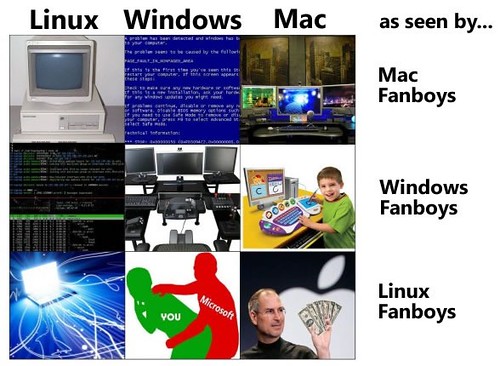
How Fan Boys See Operating Systems

IT Director for a non-profit in Washington, DC. Man About Internet.
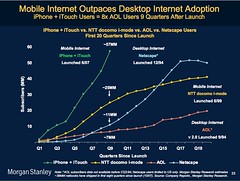 "Morgan Stanley drinks the Apple Kool-aid":
In 1995 Mark Meeker researched, at length, and wrote a piece called "The Internet Report" which became known as "the bible" of the dot-com boom.
Graphics like the one at right charting the rapid growth of the iPhone/iPod touch/iTunes ecosystem — the fastest new-tech ramp up in history, according to Meeker's team of 27 research analysts — dominated the 92-slide PowerPoint stack.
This particular slide shows that the rate of adoption of the iPhone and iPod touch in their first nine quarters on the market outpaced NTT's DoCoMo two-fold, Netscape five-fold and AOL eight-fold.
Based on past performance, according to Morgan Stanley, Apple is in the "pole position" in the race to dominate mobile Internet computing, which is supposed to be for the 2000s what desktop Internet computing was for the 1990s, personal computing for the 1980s, mini computing for the 1970s, and mainframe computing for the 1960s.
"Apple has a two or three-year lead" according to Katy Huberty, thanks to an installed base of 57 million handsets, 100,000 apps and 200 million iTunes subscribers with credit card numbers on file. (She will keep her eye, however, on Samsung, Nokia and Google's Android.)
But much of the presentation was spent showing, in slides culled from research over the past two and a half years, that the iPhone is not like previous mobile devices, and its owners not like ordinary cell phone users.
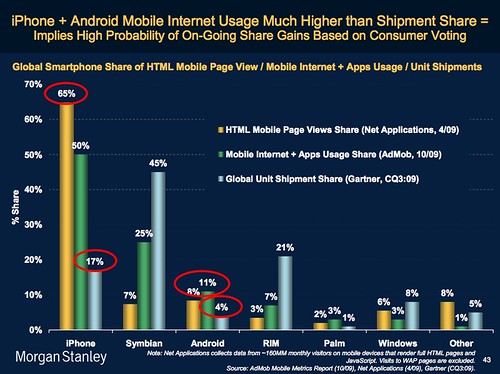
For example, although iPhone and iPod touch owners represent only 17% of the global smartphone installed base, they account for 65% of the world's mobile Web browsing and 50% of its mobile app usage (see chart below).
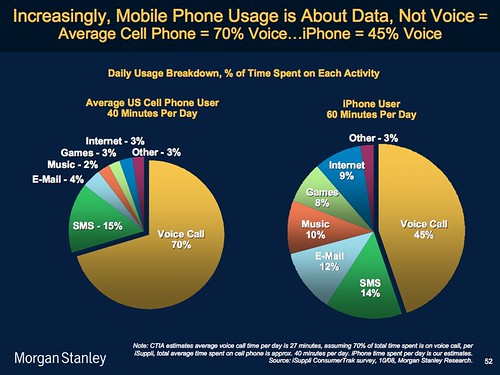
Another slide, this one a pie chart, shows that the average American cellphone user spends 40 minutes a day on a mobile phone, making calls 70% of that time. The average iPhone user, by contrast, spends 60 minutes on the device but makes calls only 45% of the time. The rest of those 60 minutes are spent texting, e-mailing, listening to music, playing games and surfing the Web.
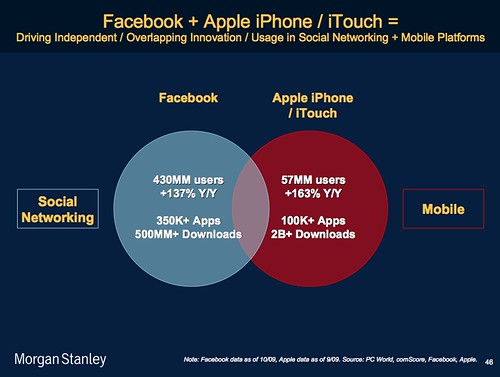
Finally, we have the Venn diagram below that compares Facebook's 350,000 apps and 137% year-over-year growth with the iPhone's 100,000 apps and 163% growth. The place where Mark Zuckerberg's 430 million users overlap with Steve Jobs' 57 million is the sweet spot of the mobile Internet. It's here, according to Morgan Stanley, where we find the future of computing.
There's lots more where this came from. You can see the 92 slides presented Tuesday at Morgan Stanley's website. But that's just an appetizer for the two main courses: a 659-slide key themes presentation and the full 424-page Mobile Internet Report.
You see, there are still things I can be proud of as an American.

Leo Laporte is without a doubt, my favorite tech pundit out there. I met Leo in August of 2008 when I was visiting my future Best Man in San Fransisco. Jacob graciously drove me up to Petaluma, CA to visit Leo's studio where Leo was gracious enough to talk with us for an hour or so on a Friday afternoon. Well, the folks over at EGuiders.com have filmed a short little documentary about Leo as a part of their 3 part series on New Media. I thought it was very well done.
Flickr Set of images from when I visited the TWiT Cottage.
Use Your iPhone or iPod touch to Lock Your Mac - Airlock - Gizmodo:
While I prefer to use a long password to protect my computer, I like the idea of being able to use a physical key to lock it. This is precisely what Airlock does, using your iPhone. It works great.
Airlock is a system preferences pane. Double-click to install it, associate it with your iPhone or iPod touch, set the security range, and that's it. I tried with my iMac 24 and my iPhone and it worked perfectly. You can even see a radar screen showing the distance between the two devices. The moment I stepped out of the limit, the screen locked. And then, as soon as I came into the perimeter, it unlocked automagically.
There is only one problem: If you use a wireless mouse or keyboard, it won't work due to a Bluetooth bug in Mac OS X. Otherwise, this thing will make you feel like James Bond.
Without the Aston Martin. And the Martini. And the laser watch. And the Scottish accent. And the hot girls. OK, so it won't really make you feel like James Bond, but come on, get on with the program here.
(Via John Gruber.)
I've been using Airlock at work for 2 days now and am loving it. Before, I was being lazy and not locking my computer when I step away from it, which is bad because I'm the webmaster and have access to...well everything. Now, It does it for me, automatically, when I leave my workstation. This utility is a really seamless and elegant solution. Also, if I ever leave my iPhone at home, I can still log in via the login/password prompt when needed. Another note - I HATE the ugly blue and black striped bar that is displayed on your screen when your computer is locked. I wrote the company that makes this App and they responded promptly saying that they've received a lot of feedback and that users should look for more lock options in the next version (screensaver, etc). More screenshots:


