

Google Wave First Look
 Gina Trapani former editor-in-chief at Lifehacker has posted an excellent article over at lifehacker (where she still posts from time-to-time) called "Google Wave First Look." I highly recommend reading her post to geek a feel of what Wave can do, that is, if you haven't already watched the demo video from the I/O Conference from earlier this year. Gina also makes this excellent point which everyone who is lucky enough to receive an invite should keep in mind:
Wave is only as useful as the people who are in it, so if you get an invitation and the privilege of giving out invitations, do use them very wisely.
Remember, you only get 8 "nominations" initially. If you blast these out to 8 of your closest friends, 6 of whom are really geeks and might not really use it, you've just run the risk of detrimentally affecting your initial wave experience because you now have no one use Wave with (unless you want to go out on Twitter and find random strangers to try it out with). Be selective with your newfound Wave granting powers :)
Tweetie 2 for iPhone and Mac Has Been Announced
Within the last 24 hours, two notable reviews have been posted of the upcoming Tweetie 2 for the iPhone which is a complete re-write of the source code of the app.
I highly recommend both to learn more about the upcoming features and improvements to the app:
- Tweetie 2.0: Leaner, Meaner, Faster, Stronger - Still the Supreme Champion
- Tweetie 2: The Complete iPhone Preview

Loren Brichter, the developer of Tweetie, posted a tweet today stating that he submitted the final build of 2.0 to Apple on the night of Sept. 29th for Apple to review & post to the App Store. I hope sooner, rather than later, considering recent App Store approval controversies.
Yesterday, after Loren's initial blog post announcing the upcoming App improvements, I @'ed him to ask if he would please restore the wonderful blue color the initial version 1.0 used (on the mac) to highlight tweets as you scrolled through them with your keyboard arrow keys. Shortly after 1.0 was removed, a certain percentage of it's users complained about this color choice. Loren chose to remove the blue and set it to white. I was a part of the OTHER group of users that hated the new white color, but preferred the original blue. He responded to me via his @atebits_support account, and while I wish he would have been a little more specific, I now look forward to a color selection drop down box. Hopefully.
I wont even begin to go into all of the upcoming new features and changes to the app. That's why I linked the two reviews above. Read those. I will say that, after reading those, I'm looking forward to Tweetie 2 with earnest on both my Mac and iPhone.

Google Wave invites to be sent out Wednesday - Sept. 30, 2009

Google Wave, Google's answer to the question "What if email was invited in 2009?", makes it's first wide-audience debut tomorrow to approximately 100,000 people.
Google clarified things earlier today with an update to their blog. They specifically highlighted the four key ways you can secure an invite. Here are the methods and what you need to know:
1. You signed up early on for a Google Wave account. Google put up a request form for Wave invites not long after Wave was announced. Most of the invites arriving tomorrow will go to people on that list. Your chances improve if you signed up early on and wrote a message to the Wave team.
2. You have an account on the Developer Preview of Wave. The Sandbox version of Google Wave has been active for a select group of developers for several months now, allowing them to test Wave, report bugs, and build Wave extensions. They will all get accounts.
3. Some paying users of Google Apps will get accounts. It’s likely several companies asked Google for invites when the real-time tool launched. They will get accounts. Some schools that use Google Apps will also get early access.
4. You are invited by someone currently using Wave. This is the most intriguing revelation made today by the search giant. Here’s how Google explained it:
“We’ll ask some of these early users to nominate people they know also to receive early invitations — Google Wave is a lot more useful if your friends, family and colleagues have it too. This, of course, will just be the beginning. If all goes well we will soon be inviting many more to try out Google Wave.”
I'm extremely excited and extremely hopeful I signed up earlier enough for an invite to make it in the first 100k.
XKCD: Tornado Hunter
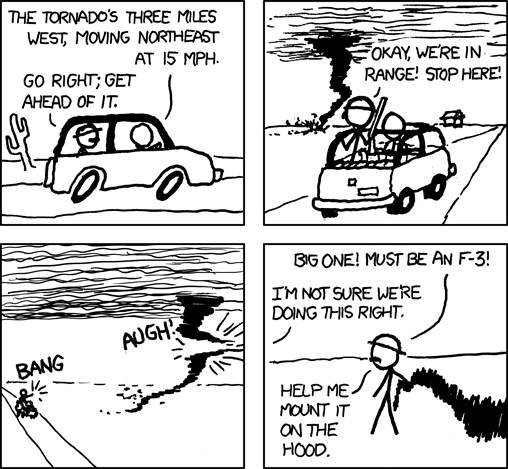 The Fujita Scale was replaced by the Enhanced Fujita Scale in 2007, but I think 'EF-5' sounds stupid, so I vote we just use the new measurements for assigning numbers but still call them 'F-whatever'.
Teabaggers Lie
Matt Kibbe, president of the astroturfing agency known as FreedomWorks, told the teabaggers assembled in Washington that ABC News had reported crowd size as 1 million to 1.5 million people. Problem is, ABC never said that:
At no time did ABC News, or its affiliates, report a number anywhere near as large. ABCNews.com reported an approximate figure of 60,000 to 70,000 protesters, attributed to the Washington, D.C., fire department. In its reports, ABC News Radio described the crowd as "tens of thousands."Nevertheless, right wing blogs all over the place keep repeating the 1.5 million number. But they've gone further than making up numbers; they've actually faked photos. On Twitter, a blogger by the name "coffee260" tried posting this photo as "proof" of the crowd size:
 Problem: there's a museum missing. That's an old photo -- look at the edges and you'll see it's a sloppy screen grab. Look at this photo from Obama's inaugural; the missing museum pops up like a yellow mushroom in the upper-right:
Who would tell such a lie? Great question! The picture was posted by a pseudonymous blogger whose stated mission is disinformation:
The vision of this website is that black Americans will become more aware of the history with regard to the political party they support overwhelmingly by 90%. By doing so, they can seize control over their own destiny and come back home to the Republican party.
Blogging only once in most months, his posts are a mix of charismatic evangelism and boilerplate FreedomWorks propaganda, including a complete schedule of town halls.
But he was in good company; Michelle Malkin got caught faking it too. Here's the picture she's been spreading all over the intertubes:

Here's the livecam shot of that same location at 3:30 pm yesterday, when 1.5 million teabaggers were supposedly streaming through this intersection:

Why does the most Christian-y political-slash-religious movement always break the commandment about lying? And when will the mainstream media just call them what they are -- lying liars who tell lies?
iTunes 9.0: Home Sharing Explained

Like most other Apple Geeks™ I watched today's Apple Event via twitter, live blogs, and Leo Laporte's TWiT Live broadcast, eagerly awaiting news about Apple's new products. When Steve reached the point in his presentation where he introduced the new iTunes 9.0 release, I was very happy to see both Home Sharing and the iPhone application organizer. The new iPhone application organizer is a no-brainer, as shown in the presentation video. Home Sharing at first seemed equally as easy to understand, but seeing as I was at work and I sync my iPhone at home, I was unable to immediately try it out. I finished my workday and quickly rushed home to try out iTunes 9.0. After a short download, installation and iPhone update to 3.1 I began playing around with the features. New iPhone content syncing options: check. iPhone app organizer: check. Home Sharing: Che....err wait. Where did it go? My fiance and I asked each other this question within minutes of one another. We had encountered a problem.
 The Home Sharing side-menu item, which initially displayed, instructed us to enter our Apple ID info, had then promptly disappeared. Sharing was not working for us the way we saw other people reporting that it was working for them on twitter, forums and other Apple blogs across the net. At first, I hypothesized that perhaps I had misunderstood the point of Home Sharing and that it was only intended to use as a way to share content across multiple computers who all use the same iTunes account. I was disappointed that my fiance and I could not both use this feature after all, and I abandoned the idea in favor of making dinner and then watching Congressman Joe Wilson (R) of South Carolina declare this evening, in front of Congress, the American Public and the World, that he was a douchebag. My fiance went off to bed while I began watching the presentation video of the Apple event from earlier today. When Apple turned over the demo to one of the other Apple employees who demoed Home Sharing, he made it very apparent that the library he was sharing with was his wife's. Something didn't seem right to me. They never mentioned using the same Apple ID, and while he wasn't clear, his language implied it was between two different Apple ID accounts.
I started searching. I turned to several blogs, gdgt.com, engadget.com, gizmodo.com, tuaw.com, macrumors.com and finally of all places, cNET where I came across this gem of an article. Deep down in the comments of this article, I ran into two back-to-back comments that cleared the entire problem up. 
This is how to get Home Sharing to work between two different Macs who both primarily are used by two different people with two different Apple ID accounts. Turn on Home Sharing on Mac #1. Input the Apple ID login/pass within the Home Sharing screen for Mac #2 (on Mac#1). Then go to Mac #2 and on the Home Sharing screen input the Apple ID login/pass for Mac #1. It seems so simple, right? If only Apple had been a little more clear on their website how to get this to work (or better yet, on the Home Sharing screen instructions).